AMA, I.P. / December 2024
Table of contents:
Under DL No. 83/2018, of October 19, which establishes the accessibility requirements for websites and mobile applications, the Agência para a Modernização Administrativa, I.P. (AMA), is responsible for presenting a report to the European Commission every three years on the monitoring results, including measurement data. This document contains the results and measurement data for the 2nd monitoring period, spanning 2022 to 2024.
For the analysis during this monitoring period, a sample of 657 websites and 33 mobile applications was selected, following the methodology proposed by Implementing Decision (EU) 2018/1524. Websites underwent two types of monitoring: simplified monitoring, which mainly involves running an automatic validator through a sample of pages, and in-depth monitoring, involving manual validation by an accessibility expert. Mobile applications were only subject to in-depth monitoring.
When selecting the sample of websites, geographical criteria (central, regional, and local) as well as type of service, demand, and sector of activity were considered. Both the website and mobile application samples were submitted for review to organizations representing people with disabilities through the Inclusion Policy Committee coordinated by the Secretary of State for the Inclusion of Persons with Disabilities.
Note: if you are unable to consult the following chart for any reason, see the data in Table 1.
In the present analysis, we used a simplified monitoring approach with a sample consisting of the first page and all pages hyperlinked from the first page within the domain, which we designated as H+. Using the H+ methodology to collect pages across all websites, we obtained an average sample of 61 pages per website. For in-depth monitoring, we selected a subset of websites from the simplified monitoring process, totaling 54 out of 657 websites. A total of 424 pages from these 54 websites were manually evaluated.
Note: if you are unable to consult the following chart for any reason, see the data in Table 17.
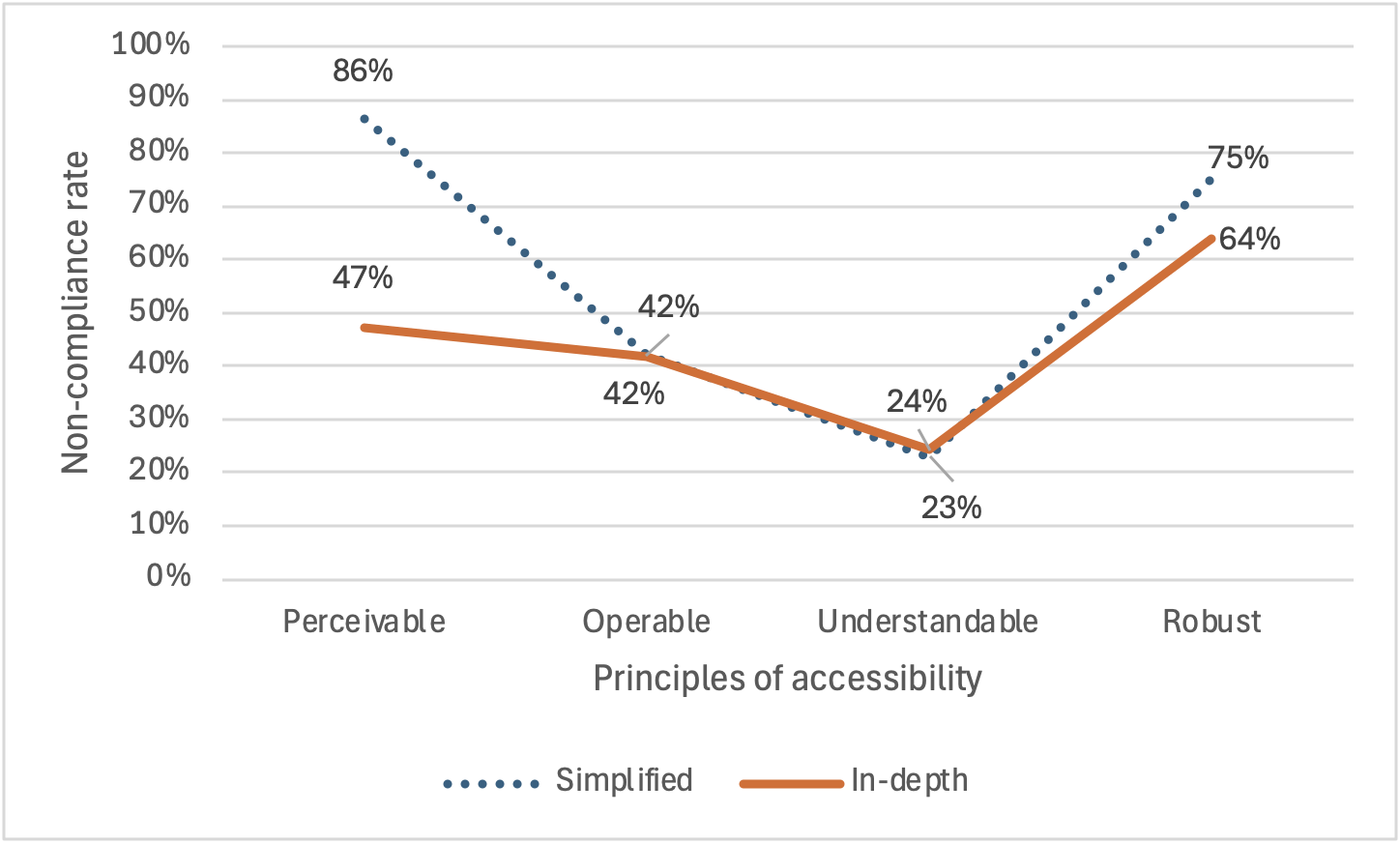
In Graph 2, the average non-compliance rate for all websites is presented for each principle, covering all the clauses of that principle. It can be observed that the two methodologies yield similar, and even identical, results for three of the principles—namely, Operable, Understandable, and Robust. The only exception is the Perceivable principle, where the difference between the results of the two methodologies is significant—approximately 40 percentage points. For this principle, as well as for the others, the simplified methodology always results in equal or higher non-compliance rates.
The simplified methodology, being based on an automated evaluation tool, assesses a significantly smaller number of requirements - 13 for the simplified methodology vs. 56 for the in-depth methodology. For three principles, the simplified methodology approximates the results of the more reliable in-depth methodology. For the Perceivable principle, the three requirements assessed by the simplified methodology present a more negative picture, with high non-compliance rates. According to the in-depth methodology, those three requirements have a 100% non-compliance rate, even higher than the 86% reported by the simplified methodology.
The mobile application sample included 16 applications from various public entities in their iOS and Android versions (32 applications), plus one Android-only application, resulting in a total of 33 mobile applications analyzed. The average non-compliance rate for all requirements was 22% for iOS applications and 24% for Android applications, showing no clear advantage for either platform.
Note: if you are unable to consult the following chart for any reason, see the data in Table 18.
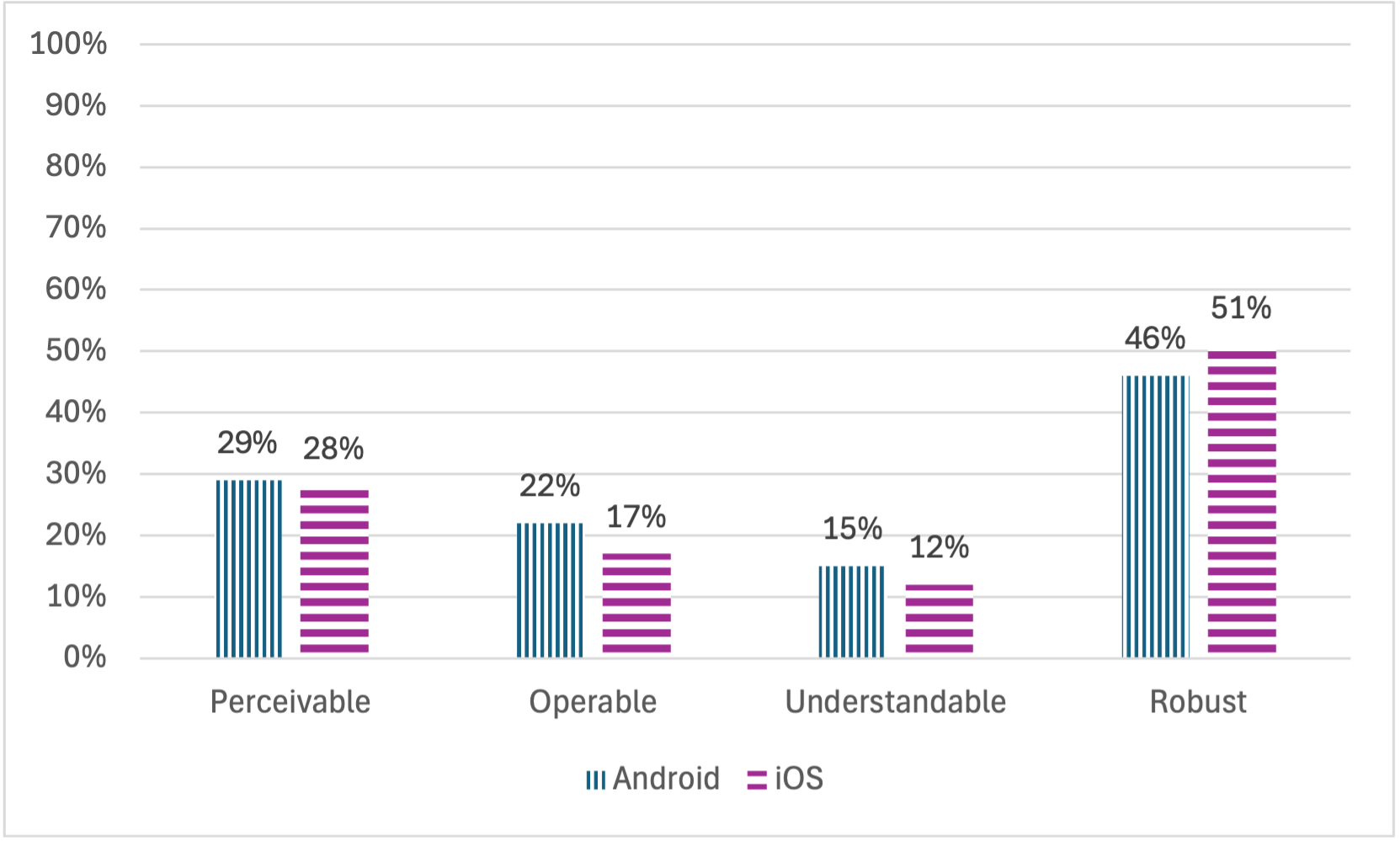
In Graph 3, the average non-compliance rates for all requirements, grouped by principle, are compared. Differences between the two operating systems are minor. iOS applications demonstrated higher compliance with the Perceivable, Operable, and Understandable principles, while Android applications performed better under the Robust principle.
Note: if you are unable to consult the following chart for any reason, see the data in Table 19.
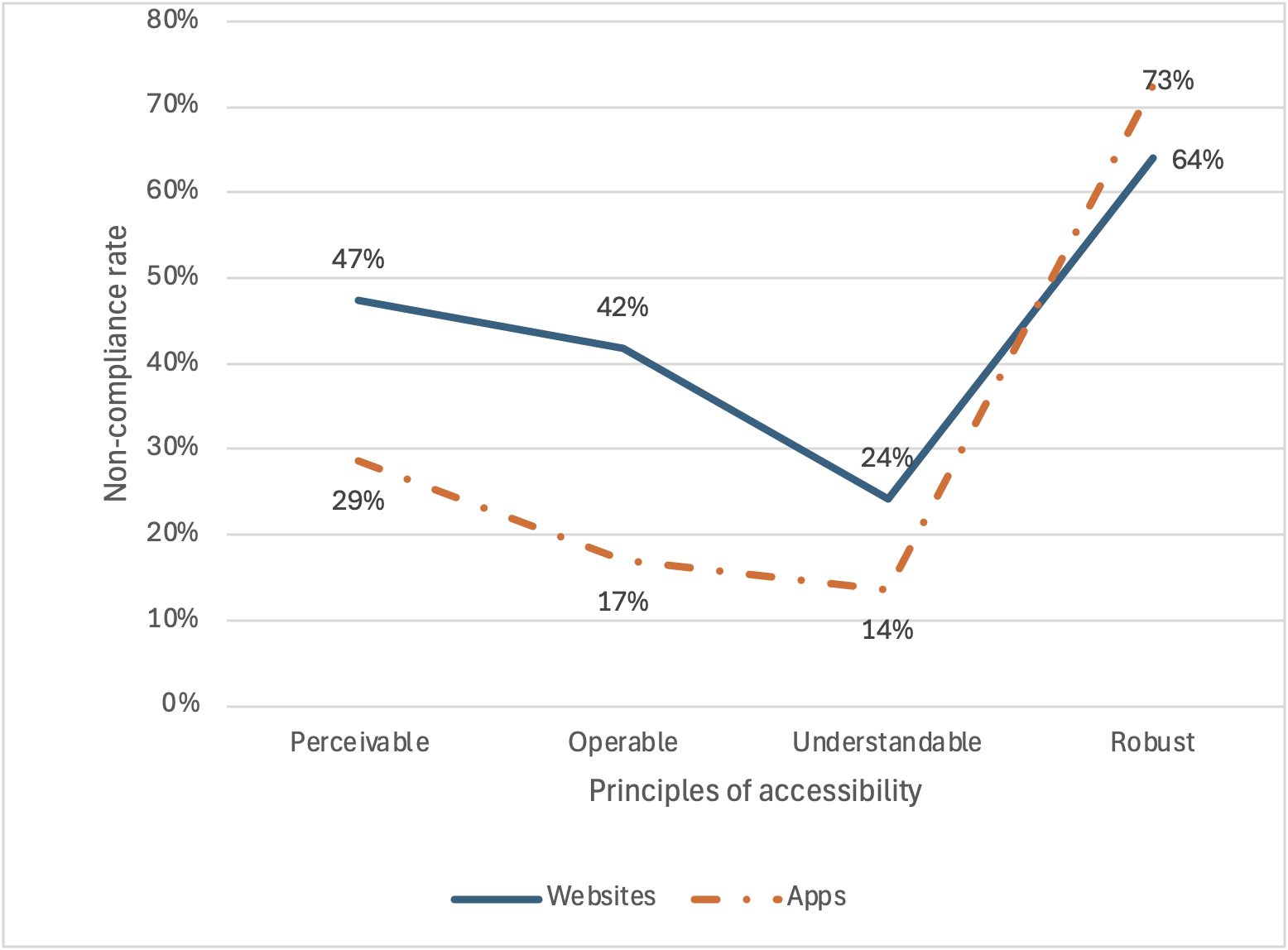
In Graph 4, the performance of websites and mobile applications across the four accessibility principles is compared. The same trends affect both websites and mobile applications—the best and worst principles coincide. However, mobile applications consistently perform better than websites, except for the Robust accessibility principle.
In fact, for mobile applications, this is the principle that saw the greatest decline from the 1st to the 2nd monitoring report. In the 2024 report, the Robust principle for both websites and mobile applications shows non-compliance rates between 60% and 70%, with mobile apps surpassing website compliance levels for the first time.
At the root of this non-compliance are issues related to the correct handling of element semantics—buttons that function as links, links presented as buttons, and interactive elements that appear as simple text. These problems leave, for example, screen reader users unaware of how to interact with such elements.
Which users face the most barriers? The European Norm EN 301 549 establishes a link between accessibility requirements and the users who benefit from these practices, referred to as Functional Performance Statements. These statements encompass not only people with disabilities but anyone facing temporary or situational limitations, such as difficulty using a smartphone in bright sunlight.
Note: if you are unable to consult the following chart for any reason, see the data in Table 20.
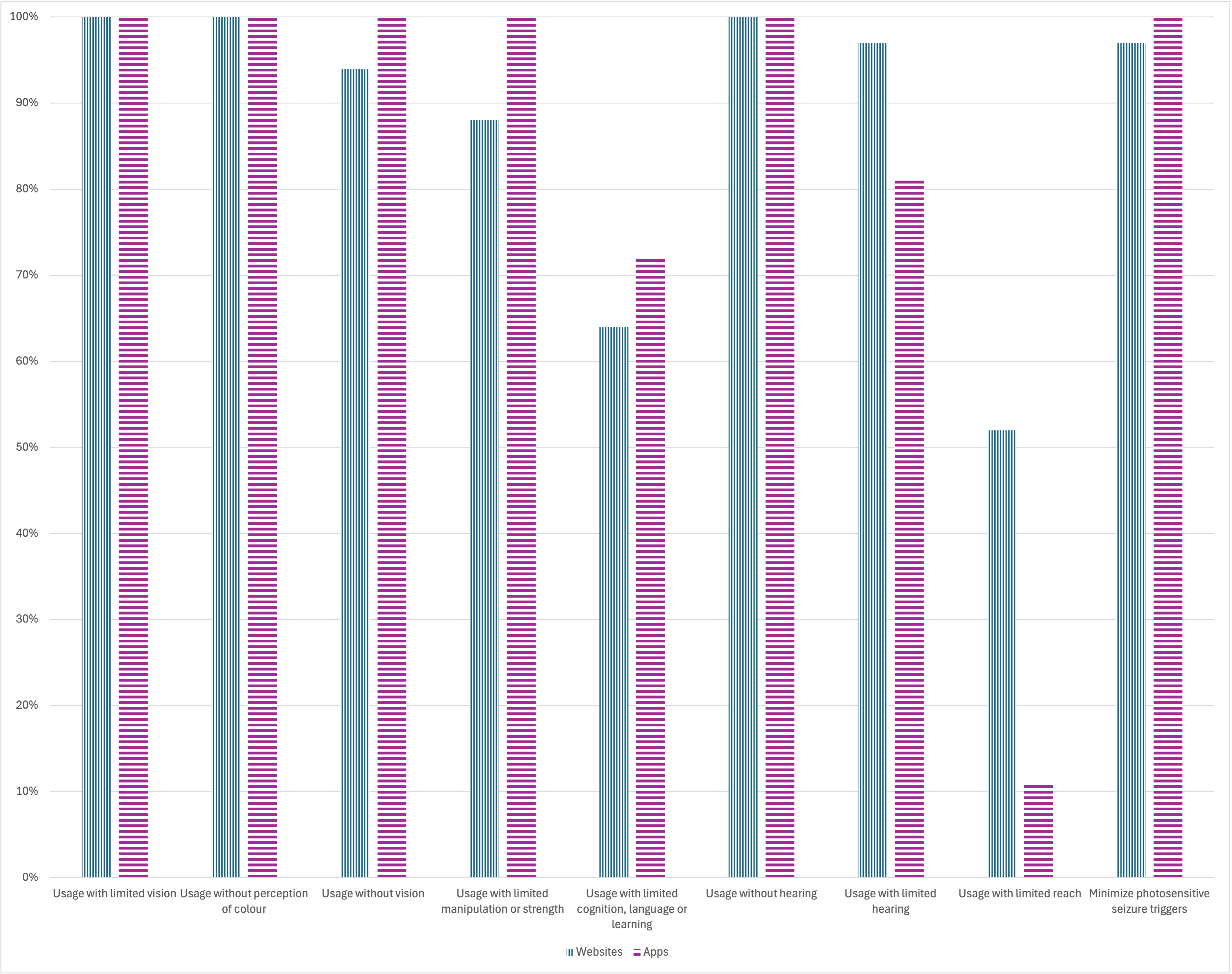
The data collected (Graph 5) indicates that nearly all websites and mobile applications have non-compliances across almost all Functional Performance Statements. The only exceptions are for the statement “Use with limited reach,” where 52% of websites and 11% of mobile applications are non-compliant, and “Use with limited cognition, language or learning,” where 64% of websites and 72% of mobile applications are non-compliant. For all other statements, non-compliance exceeds 80%, with rates above 90% for five statements.
As this report concerns the second monitoring period, comparing its results with those of the first period helps identify trends in the accessibility of public websites and mobile applications in Portugal.
Note: if you are unable to consult the following chart for any reason, see the data by requirement in Table 12.

Graph 6 compares non-compliance rates for websites, grouped by accessibility principle. The values, derived from requirements assessed in both periods, show minor differences from earlier graphs. The accessibility level of websites has not improved over this period. Non-compliance for the Perceivable principle decreased from 52% to 47%. For the Operable principle, it increased from 40% to 42%. For the Understandable principle, it rose from 22% to 24%. For the Robust principle, it dropped from 72% to 64%. Calculating the average non-compliance rates for the four principles reveals a positive evolution, with the non-compliance rate decreasing from 46.5% in the first period to 45% in the second period. However, when comparing the average non-compliance rate for all clauses (without grouping by principle), it is observable that the value remained exactly the same, at 43%.
Note: if you are unable to consult the following chart for any reason, see the data by requirement in Table 16.

Graph 7 compares non-compliance rates for mobile applications, grouped by accessibility principle. As with websites, these values reflect requirements assessed in both periods and may slightly differ from earlier graphs. The accessibility level of mobile applications also showed no improvement. Non-compliance for the Perceivable principle remained at 30%. For the Operable principle, it decreased from 21% to 17%. For the Understandable principle, it increased from 13% to 14%. For the Robust principle, it rose from 44% to 73%. In fact, for mobile applications, this is the principle that saw the greatest decline from the 1st to the 2nd monitoring report. Calculating the average non-compliance rates for the four principles reveals that, for mobile applications, there was a negative evolution, with the non-compliance rate increasing from 27% in the first period to 33.5% in the second period. However, when comparing the average non-compliance rate for all clauses (without grouping by principle), the situation for mobile applications mirrors that of websites, as the average non-compliance rate remained exactly the same, at 25%.
The monitoring activities took place from February 2024 to December 2024, according to the following timeline:
The monitoring is conducted by the Agência para a Modernização Administrativa, I.P. (AMA). For carrying out monitoring activities and drafting this report, AMA enlisted the services of the Faculdade de Ciências da Universidade de Lisboa.
The sample provided by AMA includes 657 websites and 33 mobile applications. The number of websites in the sample exceeds the minimum required by point 2.1 of Annex I of Implementing Decision (EU) 2018/1524, equivalent to two sites per 100,000 inhabitants plus 75 sites. Considering Portugal's resident population in 2023 is 10,639,726 (according to INE statistics), the minimum required is 181 sites annually. For the three-year sample period, the minimum number is 543 sites. The initial sample was analyzed to ensure that included websites were accessible for monitoring activities and corresponded to unique domains (i.e., not redirecting to other domains in the sample). After adjustments, the final sample is presented in Table 21 annex.
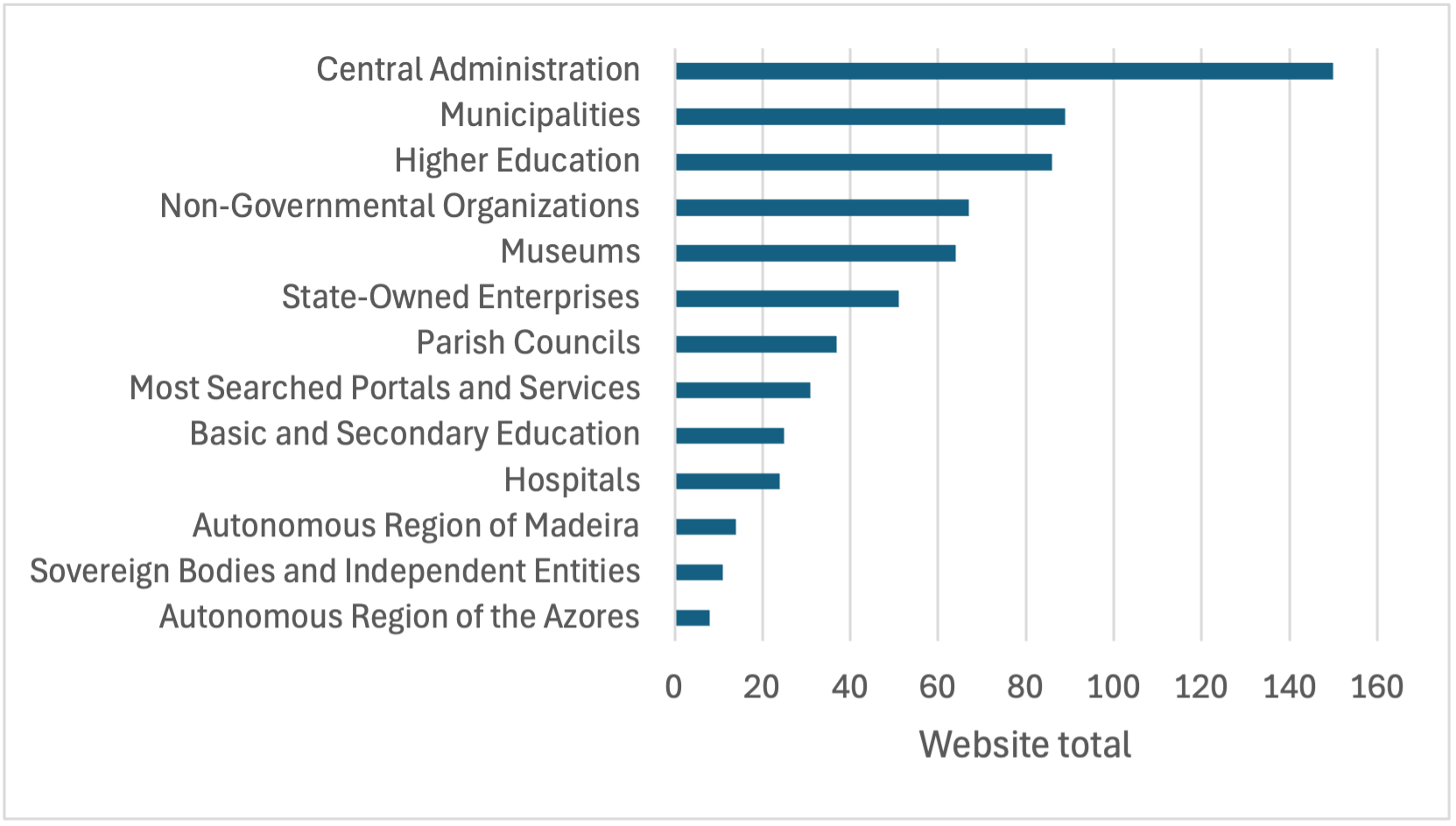
The website sample aims to represent the diverse services provided by public sector entities. The distribution of websites by service type, shown in Table 1, illustrates the variety of services considered in the sample.
| Service Type | Number of sites | % of sites |
|---|---|---|
| Central Administration | 150 | 22.8% |
| Basic and Secondary Education | 25 | 3.8% |
| Higher Education | 86 | 13.1% |
| Hospitals | 24 | 3.7% |
| Parish Councils | 37 | 5.6% |
| Municipalities | 89 | 13.5% |
| Museums | 64 | 9.7% |
| Non-Governmental Organizations | 67 | 10.2% |
| Sovereign Bodies and Independent Entities | 11 | 1.7% |
| Most Searched Portals and Services | 31 | 4.7% |
| Autonomous Region of Madeira | 14 | 2.1% |
| Autonomous Region of Azores | 8 | 1.2% |
| State-Owned Enterprises | 51 | 7.8% |
All 657 websites were initially considered for the simplified monitoring method (see Table 21). This sample consists of each website's homepage and all pages linked to the homepage within the domain.
Table 2 provides descriptive statistics of the page sample. The analysis shows that, on average, sampled websites have 61 pages linked from their homepage.
| Statistic | Sample |
|---|---|
| Websites | 657 |
| Total Pages | 40,215 |
| Pages per Website | 61 |
The final sample of websites for in-depth monitoring is presented in Table 22 in the annex. Websites for in-depth monitoring are a subset of websites used for simplified monitoring.
The mobile applications included in the sample were selected by AMA. iOS and Android versions of the same entity's application were considered individually, analyzing both versions of 16 applications and one Android-only application, totaling 33 mobile applications.
The final mobile application sample for in-depth monitoring is shown in Table 23 in the annex.
Pages from the 657 website sample were obtained through web crawling. The QualWeb Crawler was the primary tool used, capable of processing JavaScript-enabled pages.
Accessibility evaluation of each sampled page was conducted using the AccessMonitor automated accessibility evaluation tool. This tool validated compliance with 37 tests based on sufficient and recommended techniques from the Web Content Accessibility Guidelines (WCAG).
The requirements of EN 301 549 tested by AccessMonitor are listed in Table 3, along with corresponding WCAG success criteria.
| EN Requirement | Requirement Name | CS WCAG | CS Name |
|---|---|---|---|
| 9.1.1.1 | Non-text content | 1.1.1 | Non-text content |
| 9.1.3.1 | Info and relationships | 1.3.1 | Info and relationships |
| 9.1.4.3 | Contrast (minimum) | 1.4.3 | Contrast (minimum) |
| 9.2.1.1 | Keyboard | 2.1.1 | Keyboard |
| 9.2.4.1 | Bypass blocks | 2.4.1 | Bypass blocks |
| 9.2.4.2 | Page titled | 2.4.2 | Page titled |
| 9.2.4.4 | Link purpose (in context) | 2.4.4 | Link purpose (in context) |
| 9.2.4.5 | Multiple ways | 2.4.5 | Multiple ways |
| 9.2.5.3 | Label in name | 2.5.3 | Label in name |
| 9.3.1.1 | Language of page | 3.1.1 | Language of page |
| 9.3.2.2 | On input | 3.2.2 | On input |
| 9.4.1.1 | Parsing | 4.1.1 | Parsing |
| 9.4.1.2 | Name, role, value | 4.1.2 | Name, role, value |
For each sampled website, a representative set of pages was defined for evaluation, as specified in the Commission Implementing Decision (EU) 2018/1524. This representative sample includes:
Each page in the representative sample was evaluated against WCAG 2.1 AA success criteria. For each page, one of the following results was provided:
Evaluation was conducted using the Accessibility Insights tool, which covers all success criteria of WCAG 2.2, exceeding WCAG 2.1 and EN 301 549 requirements.
Additional support was provided by the Color Contrast Analyzer (CCA) tool.
Table 4 lists the EN 301 549 requirements and corresponding WCAG success criteria considered in this evaluation.
| EN Requirement | Requirement Name | WCAG CS | CS Name |
|---|---|---|---|
| 9.1.1.1 | Non-text Content | 1.1.1 | Non-text Content |
| 9.1.2.1 | Audio-Only and Video-Only (pre-recorded) | 1.2.1 | Audio-Only and Video-Only (pre-recorded) |
| 9.1.2.2 | Captions (pre-recorded) | 1.2.2 | Captions (pre-recorded) |
| 9.1.2.3 | Audio Description or Media Alternative (pre-recorded) | 1.2.3 | Audio Description or Media Alternative (pre-recorded) |
| 9.1.2.5 | Audio Description (pre-recorded) | 1.2.5 | Audio Description (pre-recorded) |
| 9.1.3.1 | Info and Relationships | 1.3.1 | Info and Relationships |
| 9.1.3.2 | Meaningful Sequence | 1.3.2 | Meaningful Sequence |
| 9.1.3.3 | Sensory Characteristics | 1.3.3 | Sensory Characteristics |
| 9.1.3.4 | Orientation | 1.3.4 | Orientation |
| 9.1.3.5 | Identify Input Purpose | 1.3.5 | Identify Input Purpose |
| 9.1.4.1 | Use of Color | 1.4.1 | Use of Color |
| 9.1.4.2 | Audio Control | 1.4.2 | Audio Control |
| 9.1.4.3 | Contrast (minimum) | 1.4.3 | Contrast (Minimum) |
| 9.1.4.4 | Resize Text | 1.4.4 | Resize Text |
| 9.1.4.5 | Images of Text | 1.4.5 | Images of Text |
| 9.1.4.10 | Reflow | 1.4.10 | Reflow |
| 9.1.4.11 | Non-text Contrast | 1.4.11 | Non-text Content Contrast |
| 9.1.4.12 | Text Spacing | 1.4.12 | Text Spacing |
| 9.1.4.13 | Content on Hover of Focus | 1.4.13 | Content on Hover or Focus |
| 9.2.1.1 | Keyboard | 2.1.1 | Keyboard |
| 9.2.1.2 | No Keyboard Trap | 2.1.2 | No Keyboard Trap |
| 9.2.1.4 | Character Shortcut Keys | 2.1.4 | Character Shortcut Keys |
| 9.2.2.1 | Timing Adjustable | 2.2.1 | Timing Adjustable |
| 9.2.2.2 | Pause, Stop, Hide | 2.2.2 | Pause, Stop, Hide |
| 9.2.3.1 | Three Flashes or Below Threshold | 2.3.1 | Three Flashes or Below the Threshold |
| 9.2.4.1 | Bypass Blocks | 2.4.1 | Bypass Blocks |
| 9.2.4.2 | Page Titled | 2.4.2 | Page Titled |
| 9.2.4.3 | Focus Order | 2.4.3 | Focus Order |
| 9.2.4.4 | Link Purpose (in Context) | 2.4.4 | Link Purpose (in Context) |
| 9.2.4.5 | Multiple Ways | 2.4.5 | Multiple Ways |
| 9.2.4.6 | Headings and Labels | 2.4.6 | Headings and Labels |
| 9.2.4.7 | Focus Visible | 2.4.7 | Focus Visible |
| 9.2.5.1 | Pointer Gestures | 2.5.1 | Pointer Gestures |
| 9.2.5.2 | Pointer Cancellation | 2.5.2 | Pointer Cancellation |
| 9.2.5.3 | Label in Name | 2.5.3 | Label in Name |
| 9.2.5.4 | Motion Actuation | 2.5.4 | Motion Actuation |
| 9.3.1.1 | Language of Page | 3.1.1 | Language of Page |
| 9.3.1.2 | Language of Parts | 3.1.2 | Language of Parts |
| 9.3.2.1 | On Focus | 3.2.1 | On Focus |
| 9.3.2.2 | On Input | 3.2.2 | On Input |
| 9.3.2.3 | Consistent Navigation | 3.2.3 | Consistent Navigation |
| 9.3.2.4 | Consistent Identification | 3.2.4 | Consistent Identification |
| 9.3.3.1 | Error Identification | 3.3.1 | Error Identification |
| 9.3.3.2 | Labels or Instructions | 3.3.2 | Labels or Instructions |
| 9.3.3.3 | Error Suggestion | 3.3.3 | Error Suggestion |
| 9.3.3.4 | Error Prevention (Legal, Financial, Data) | 3.3.4 | Error Prevention (Legal, Financial, Data) |
| 9.4.1.1 | Parsing | 4.1.1 | Parsing |
| 9.4.1.2 | Name, Role, Value | 4.1.2 | Name, Role, Value |
| 9.4.1.3 | Status Messages (WCAG 2.1) | 4.1.3 | Status Messages |
| 9.6 | WCAG Conformance Requirements | 5.2 | Conformance Requirements |
| 10.1.1.1 | Non-text Content | 1.1.1 | Non-text Content |
| 10.1.2.1 | Audio-Only and Video-Only (pre-recorded) | 1.2.1 | Audio-Only and Video-Only (pre-recorded) |
| 10.1.2.2 | Captions (pre-recorded) | 1.2.2 | Captions (pre-recorded) |
| 10.1.2.3 | Audio Description or Media Alternative (pre-recorded) | 1.2.3 | Audio Description or Media Alternative (pre-recorded) |
| 10.1.2.5 | Audio Description (pre-recorded) | 1.2.5 | Audio Description (pre-recorded) |
| 10.1.3.1 | Info and Relationships | 1.3.1 | Info and Relationships |
| 10.1.3.2 | Meaningful Sequence | 1.3.2 | Meaningful Sequence |
| 10.1.3.3 | Sensory Characteristics | 1.3.3 | Sensory Characteristics |
| 10.1.3.4 | Orientation | 1.3.4 | Orientation |
| 10.1.3.5 | Identify Input Purpose | 1.3.5 | Identify Input Purpose |
| 10.1.4.1 | Use of Color | 1.4.1 | Use of Color |
| 10.1.4.2 | Audio Control | 1.4.2 | Audio Control |
| 10.1.4.3 | Contrast (minimum) | 1.4.3 | Contrast (Minimum) |
| 10.1.4.4 | Resize Text | 1.4.4 | Resize Text |
| 10.1.4.5 | Images of Text | 1.4.5 | Images of Text |
| 10.1.4.10 | Reflow | 1.4.10 | Reflow |
| 10.1.4.11 | Non-text Contrast | 1.4.11 | Non-text Content Contrast |
| 10.1.4.12 | Text Spacing | 1.4.12 | Text Spacing |
| 10.1.4.13 | Content on Hover or Focus | 1.4.13 | Content on Hover or Focus |
| 10.2.1.1 | Keyboard | 2.1.1 | Keyboard |
| 10.2.1.2 | No Keyboard Trap | 2.1.2 | No Keyboard Trap |
| 10.2.1.4 | Character Shortcut Keys | 2.1.4 | Character Shortcut Keys |
| 10.2.2.1 | Timing Adjustable | 2.2.1 | Timing Adjustable |
| 10.2.2.2 | Pause, Stop, Hide | 2.2.2 | Pause, Stop, Hide |
| 10.2.3.1 | Three Flashes or Below Threshold | 2.3.1 | Three Flashes or Below the Threshold |
| 10.2.4.1 | Bypass Blocks | 2.4.1 | Bypass Blocks |
| 10.2.4.2 | Page Titled | 2.4.2 | Page Titled |
| 10.2.4.3 | Focus Order | 2.4.3 | Focus Order |
| 10.2.4.4 | Link Purpose (in Context) | 2.4.4 | Link Purpose (in Context) |
| 10.2.4.5 | Multiple Ways | 2.4.5 | Multiple Ways |
| 10.2.4.6 | Headings and Labels | 2.4.6 | Headings and Labels |
| 10.2.4.7 | Focus Visible | 2.4.7 | Focus Visible |
| 10.2.5.1 | Pointer Gestures | 2.5.1 | Pointer Gestures |
| 10.2.5.2 | Pointer Cancellation | 2.5.2 | Pointer Cancellation |
| 10.2.5.3 | Label in Name | 2.5.3 | Label in Name |
| 10.2.5.4 | Motion Actuation | 2.5.4 | Motion Actuation |
| 10.3.1.1 | Language of Page | 3.1.1 | Language of Page |
| 10.3.1.2 | Language of Parts | 3.1.2 | Language of Parts |
| 10.3.2.1 | On Focus | 3.2.1 | On Focus |
| 10.3.2.2 | On Input | 3.2.2 | On Input |
| 10.3.2.3 | Consistent Navigation | 3.2.3 | Consistent Navigation |
| 10.3.2.4 | Consistent Identification | 3.2.4 | Consistent Identification |
| 10.3.3.1 | Error Identification | 3.3.1 | Error Identification |
| 10.3.3.2 | Labels or Instructions | 3.3.2 | Labels or Instructions |
| 10.3.3.3 | Error Suggestion | 3.3.3 | Error Suggestion |
| 10.3.3.4 | Error Prevention (Legal, Financial, Data) | 3.3.4 | Error Prevention (Legal, Financial, Data) |
| 10.4.1.1 | Parsing | 4.1.1 | Parsing |
| 10.4.1.2 | Name, Role, Value | 4.1.2 | Name, Role, Value |
| 10.4.1.3 | Status Messages (WCAG 2.1) | 4.1.3 | Status Messages |
Both iOS and Android versions of the same application were considered individually. Applications were installed directly from their respective app stores, using standard user accounts for evaluation, except for one case where an account could not be obtained. Screens selected for evaluation followed the methodology defined in points 2 and 3 of Annex I of the Commission Implementing Decision (EU) 2018/1524. This representative sample includes:
Manual evaluation of mobile applications was supported by the following tools and devices:
Testing methodology for manual evaluations was based on the Trusted Tester methodology. While the Trusted Tester is based on WCAG 2.0, additional tests were added to cover WCAG 2.1 AA success criteria as required by EN 301 549. Added tests were based on sufficient techniques from WCAG 2.1.
The success criteria considered in this evaluation correspond to WCAG 2.1 AA compliance as outlined in EN 301 549, detailed in Table 5.
| EN Requirement | Requirement Name | WCAG CS | CS Name |
|---|---|---|---|
| 10.1.1.1 | Non-text Content | 1.1.1 | Non-text Content |
| 10.1.2.1 | Audio-Only and Video-Only (pre-recorded) | 1.2.1 | Audio-Only and Video-Only (pre-recorded) |
| 10.1.2.2 | Captions (pre-recorded) | 1.2.2 | Captions (pre-recorded) |
| 10.1.2.3 | Audio Description or Media Alternative (pre-recorded) | 1.2.3 | Audio Description or Media Alternative (pre-recorded) |
| 10.1.2.5 | Audio Description (pre-recorded) | 1.2.5 | Audio Description (pre-recorded) |
| 10.1.3.1 | Info and Relationships | 1.3.1 | Info and Relationships |
| 10.1.3.2 | Meaningful Sequence | 1.3.2 | Meaningful Sequence |
| 10.1.3.3 | Sensory Characteristics | 1.3.3 | Sensory Characteristics |
| 10.1.3.4 | Orientation | 1.3.4 | Orientation |
| 10.1.3.5 | Identify Input Purpose | 1.3.5 | Identify Input Purpose |
| 10.1.4.1 | Use of Color | 1.4.1 | Use of Color |
| 10.1.4.2 | Audio Control | 1.4.2 | Audio Control |
| 10.1.4.3 | Contrast (minimum) | 1.4.3 | Contrast (Minimum) |
| 10.1.4.4 | Resize Text | 1.4.4 | Resize Text |
| 10.1.4.5 | Images of Text | 1.4.5 | Images of Text |
| 10.1.4.10 | Reflow | 1.4.10 | Reflow |
| 10.1.4.11 | Non-text Contrast | 1.4.11 | Non-text Content Contrast |
| 10.1.4.12 | Text Spacing | 1.4.12 | Text Spacing |
| 10.1.4.13 | Content on Hover of Focus | 1.4.13 | Content on Hover or Focus |
| 10.2.1.1 | Keyboard | 2.1.1 | Keyboard |
| 10.2.1.2 | No Keyboard Trap | 2.1.2 | No Keyboard Trap |
| 10.2.1.4 | Character Shortcut Keys | 2.1.4 | Character Shortcut Keys |
| 10.2.2.1 | Timing Adjustable | 2.2.1 | Timing Adjustable |
| 10.2.2.2 | Pause, Stop, Hide | 2.2.2 | Pause, Stop, Hide |
| 10.2.3.1 | Three Flashes or Below Threshold | 2.3.1 | Three Flashes or Below the Threshold |
| 10.2.4.2 | Page Titled | 2.4.2 | Page Titled |
| 10.2.4.3 | Focus Order | 2.4.3 | Focus Order |
| 10.2.4.4 | Link Purpose (in Context) | 2.4.4 | Link Purpose (in Context) |
| 10.2.4.6 | Headings and Labels | 2.4.6 | Headings and Labels |
| 10.2.4.7 | Focus Visible | 2.4.7 | Focus Visible |
| 10.2.5.1 | Pointer Gestures | 2.5.1 | Pointer Gestures |
| 10.2.5.2 | Pointer Cancellation | 2.5.2 | Pointer Cancellation |
| 10.2.5.3 | Label in Name | 2.5.3 | Label in Name |
| 10.2.5.4 | Motion Actuation | 2.5.4 | Motion Actuation |
| 10.3.1.1 | Language of Page | 3.1.1 | Language of Page |
| 10.3.2.1 | On Focus | 3.2.1 | On Focus |
| 10.3.2.2 | On Input | 3.2.2 | On Input |
| 10.3.3.1 | Error Identification | 3.3.1 | Error Identification |
| 10.3.3.2 | Labels or Instructions | 3.3.2 | Labels or Instructions |
| 10.3.3.3 | Error Suggestion | 3.3.3 | Error Suggestion |
| 10.3.3.4 | Error Prevention (Legal, Financial, Data) | 3.3.4 | Error Prevention (Legal, Financial, Data) |
| 10.4.1.1 | Parsing | 4.1.1 | Parsing |
| 10.4.1.2 | Name, Role, Value | 4.1.2 | Name, Role, Value |
| 10.4.1.3 | Status Messages (WCAG 2.1) | 4.1.3 | Status Messages |
| 11.1.1.1 | Non-text Content | 1.1.1 | Non-text Content |
| 11.1.2.1 | Audio-Only and Video-Only (pre-recorded) | 1.2.1 | Audio-Only and Video-Only (pre-recorded) |
| 11.1.2.2 | Captions (pre-recorded) | 1.2.2 | Captions (pre-recorded) |
| 11.1.2.3 | Audio Description or Media Alternative (pre-recorded) | 1.2.3 | Audio Description or Media Alternative (pre-recorded) |
| 11.1.2.5 | Audio Description (pre-recorded) | 1.2.5 | Audio Description (pre-recorded) |
| 11.1.3.1 | Info and Relationships | 1.3.1 | Info and Relationships |
| 11.1.3.2 | Meaningful Sequence | 1.3.2 | Meaningful Sequence |
| 11.1.3.3 | Sensory Characteristics | 1.3.3 | Sensory Characteristics |
| 11.1.3.4 | Orientation | 1.3.4 | Orientation |
| 11.1.3.5 | Identify Input Purpose | 1.3.5 | Identify Input Purpose |
| 11.1.4.1 | Use of Color | 1.4.1 | Use of Color |
| 11.1.4.2 | Audio Control | 1.4.2 | Audio Control |
| 11.1.4.3 | Contrast (minimum) | 1.4.3 | Contrast (Minimum) |
| 11.1.4.4 | Resize Text | 1.4.4 | Resize Text |
| 11.1.4.5 | Images of Text | 1.4.5 | Images of Text |
| 11.1.4.10 | Reflow | 1.4.10 | Reflow |
| 11.1.4.11 | Non-text Contrast | 1.4.11 | Non-text Content Contrast |
| 11.1.4.12 | Text Spacing | 1.4.12 | Text Spacing |
| 11.1.4.13 | Content on Hover or Focus | 1.4.13 | Content on Hover or Focus |
| 11.2.1.1 | Keyboard | 2.1.1 | Keyboard |
| 11.2.1.2 | No Keyboard Trap | 2.1.2 | No Keyboard Trap |
| 11.2.1.4 | Character Shortcut Keys | 2.1.4 | Character Shortcut Keys |
| 11.2.2.1 | Timing Adjustable | 2.2.1 | Timing Adjustable |
| 11.2.2.2 | Pause, Stop, Hide | 2.2.2 | Pause, Stop, Hide |
| 11.2.3.1 | Three Flashes or Below Threshold | 2.3.1 | Three Flashes or Below the Threshold |
| 11.2.4.2 | Page Titled | 2.4.2 | Page Titled |
| 11.2.4.3 | Focus Order | 2.4.3 | Focus Order |
| 11.2.4.4 | Link Purpose (in Context) | 2.4.4 | Link Purpose (in Context) |
| 11.2.4.6 | Headings and Labels | 2.4.6 | Headings and Labels |
| 11.2.4.7 | Focus Visible | 2.4.7 | Focus Visible |
| 11.2.5.1 | Pointer Gestures | 2.5.1 | Pointer Gestures |
| 11.2.5.2 | Pointer Cancellation | 2.5.2 | Pointer Cancellation |
| 11.2.5.3 | Label in Name | 2.5.3 | Label in Name |
| 11.2.5.4 | Motion Actuation | 2.5.4 | Motion Actuation |
| 11.3.1.1 | Language of Page | 3.1.1 | Language of Page |
| 11.3.2.1 | On Focus | 3.2.1 | On Focus |
| 11.3.2.2 | On Input | 3.2.2 | On Input |
| 11.3.3.1 | Error Identification | 3.3.1 | Error Identification |
| 11.3.3.2 | Labels or Instructions | 3.3.2 | Labels or Instructions |
| 11.3.3.3 | Error Suggestion | 3.3.3 | Error Suggestion |
| 11.3.3.4 | Error Prevention (Legal, Financial, Data) | 3.3.4 | Error Prevention (Legal, Financial, Data) |
| 11.4.1.1 | Parsing | 4.1.1 | Parsing |
| 11.4.1.2 | Name, Role, Value | 4.1.2 | Name, Role, Value |
| 11.4.1.3 | Status Messages (WCAG 2.1) | 4.1.3 | Status Messages |
A report for each application was recorded for future analysis. After evaluations, the results were analyzed considering the verified and violated requirements.
In total, 657 websites were analyzed, encompassing 40,215 pages, with an average of 61 pages per website.
Table 6 shows the number (and percentage) of websites violating each tested requirement.
| EN 301 549 Requirement | WCAG Conformance Level | Number of Non-compliances | Percentage of Non-compliances |
|---|---|---|---|
| 9.1.1.1 Non-text Content | A | 479 | 73% |
| 9.1.3.1 Info and Relationships | A | 642 | 98% |
| 9.1.4.3 Contrast (Minimum) | A | 579 | 88% |
| 9.2.1.1 Keyboard | A | 273 | 42% |
| 9.2.4.1 Bypass Blocks | A | 599 | 91% |
| 9.2.4.2 Page Titled | A | 57 | 9% |
| 9.2.4.4 Link Purpose (in Context) | A | 600 | 91% |
| 9.2.4.5 Multiple Ways | AA | 94 | 14% |
| 9.2.5.3 Label in Name | A | 171 | 26% |
| 9.3.1.1 Language of Page | A | 153 | 23% |
| 9.3.2.2 On Input | A | 237 | 36% |
| 9.4.1.1 Parsing | A | 377 | 57% |
| 9.4.1.2 Name, Role, Value | A | 612 | 93% |
From Table 6, we conclude that compliance with the tested requirements of EN 301 549 was low. The requirements with the highest non-compliance rates were:
The performance of websites concerning the functional performance statements was analyzed, focusing on requirements that support these statements (primary relationships). Based on the evaluated requirements, 7 of the 11 functional performance statements were considered.
Table 7 presents the results.
| Functional Performance Statement | Number of Non-Conformities | Percentage of Non-Conformities |
|---|---|---|
| Usage Without Vision (WV) | 654 | 100% |
| Usage with Limited Vision (LV) | 652 | 99% |
| Usage Without Color Perception (WPC) | 579 | 88% |
| Usage Without Hearing (WH) | 479 | 73% |
| Usage with Limited Manipulation or Strength (LMS) | 646 | 98% |
| Usage with Limited Reach (LR) | 171 | 26% |
| Usage with Limited Cognition, Language or Learning (LC) | 540 | 97% |
From Table 7, we conclude that non-compliance with functional performance statements is significant when assessed based on the primary relationships. The functional performance statement with the lowest non-compliance rate was:
Table 8 shows the number (and percentage) of web pages violating each tested requirement, along with the average violations per page.
| EN 301 549 Requirement | WCAG Conformance Level | Number of Non-Conformities | Percentage of Non-Conformities | Average Violations per Page |
|---|---|---|---|---|
| 9.1.1.1 Non-text Content | A | 14,366 | 36% | 2.05 |
| 9.1.3.1 Info and Relationships | A | 34,016 | 85% | 7.36 |
| 9.1.4.3 Contrast (Minimum) | A | 31,973 | 80% | 13.21 |
| 9.2.1.1 Keyboard | A | 5,398 | 13% | 1.39 |
| 9.2.4.1 Bypass Blocks | A | 21,990 | 55% | 1.22 |
| 9.2.4.2 Page Titled | A | 329 | 1% | 0.01 |
| 9.2.4.4 Link Purpose (In Context) | A | 26,278 | 65% | 17.49 |
| 9.2.4.5 Multiple Ways | AA | 582 | 1% | 0.01 |
| 9.2.5.3 Label in Name | A | 4,922 | 12% | 0.33 |
| 9.3.1.1 Language of Page | A | 3,616 | 9% | 0.09 |
| 9.3.2.2 On Input | A | 6,904 | 17% | 0.21 |
| 9.4.1.1 Parsing | A | 9,773 | 24% | 9.33 |
| 9.4.1.2 Name, Role, Value | A | 23,666 | 59% | 4.74 |
From Table 8, we conclude that compliance with the tested requirements of EN 301 549 was also low at the page level. The requirements with the highest non-compliance rates were:
The simplified monitoring method identified the most frequent non-compliances with the EN 301 549 requirements detectable by the automated tool used. Key findings include:
Table 9 compares the percentage of websites violating the success criteria in both monitoring exercises.
| EN 301 549 Requirement | WCAG Conformance Level | Percentage of Non-Conformities in 1st Report | Percentage of Non-Conformities in 2nd Report | Difference |
|---|---|---|---|---|
| 9.1.1.1 Non-text Content | A | 72% | 73% | +1% |
| 9.1.3.1 Info and Relationships | A | 75% | 98% | +23% |
| 9.1.4.3 Contrast (Minimum) | AA | 92% | 88% | -4% |
| 9.2.1.1 Keyboard | A | 8% | 42% | +34% |
| 9.2.4.2 Page Titled | A | 3% | 9% | +6% |
| 9.2.4.4 Link Purpose (In Context) | A | 89% | 91% | +2% |
| 9.2.5.3 Label in Name | A | 15% | 26% | +9% |
| 9.3.1.1 Language of Page | A | 20% | 23% | +3% |
| 9.4.1.1 Parsing | A | 70% | 57% | -13% |
| 9.4.1.2 Name, Role, Value | A | 98% | 93% | -5% |
From Table 9, we note a negative trend from the first to the second monitoring period. Violations increased for two requirements: "9.1.3.1 Info and Relationships" and "9.2.1.1 Keyboard." While the increase for the first may result from enhanced testing capabilities, the second reflects a lack of concern for keyboard accessibility.
On a positive note, compliance with requirements under the "Robust" WCAG principle, particularly "9.4.1.1 Parsing," improved. This may reflect the adoption of tools for syntactic validation. However, it's worth noting that modern browsers often correct such errors automatically, and this success criterion has been removed in the latest WCAG version.
This section describes the results for 54 websites. A total of 424 pages were analyzed, averaging 8 pages per website.
Table 10 presents the number (and percentage) of websites violating each EN 301 549 requirement.
| EN 301 549 Requirement | WCAG Conformance Level | Number of Non-Conformities | Percentage of Non-Conformities |
|---|---|---|---|
| 9.1.1.1 Non-text Content | A | 54 | 100% |
| 9.1.2.1 Audio-Only and Video-Only (Pre-recorded) | A | 13 | 24% |
| 9.1.2.2 Captions (Pre-recorded) | A | 16 | 30% |
| 9.1.2.3 Audio Description or Media Alternative (Pre-recorded) | A | 17 | 31% |
| 9.1.2.4 Captions (Live) | AA | 0 | 0% |
| 9.1.2.5 Audio Description (Pre-recorded) | AA | 17 | 31% |
| 9.1.3.1 Info and Relationships | A | 54 | 100% |
| 9.1.3.2 Meaningful Sequence | A | 44 | 81% |
| 9.1.3.3 Sensory Characteristics | A | 1 | 2% |
| 9.1.3.4 Orientation | AA | 3 | 6% |
| 9.1.3.5 Identify Input Purpose | AA | 25 | 46% |
| 9.1.4.1 Use of Color | A | 32 | 59% |
| 9.1.4.2 Audio Control | A | 1 | 2% |
| 9.1.4.3 Contrast (Minimum) | AA | 54 | 100% |
| 9.1.4.4 Text Resize | AA | 37 | 69% |
| 9.1.4.5 Images of Text | AA | 16 | 30% |
| 9.1.4.10 Reflow | AA | 32 | 59% |
| 9.1.4.11 Non-text Contrast | AA | 32 | 59% |
| 9.1.4.12 Text Spacing | AA | 32 | 59% |
| 9.1.4.13 Content on Hover or Focus | AA | 32 | 59% |
| 9.2.1.1 Keyboard | A | 52 | 96% |
| 9.2.1.2 No Keyboard Trap | A | 5 | 9% |
| 9.2.1.4 Character Key Shortcuts | A | 0 | 0% |
| 9.2.2.1 Timing Adjustable | A | 3 | 6% |
| 9.2.2.2 Pause, Stop, Hide | A | 22 | 41% |
| 9.2.3.1 Three Flashes or Below Threshold | A | 0 | 0% |
| 9.2.4.1 Bypass Blocks | A | 38 | 70% |
| 9.2.4.2 Page Titled | A | 23 | 43% |
| 9.2.4.3 Focus Order | A | 36 | 67% |
| 9.2.4.4 Link Purpose (In Context) | A | 52 | 96% |
| 9.2.4.5 Multiple Ways | AA | 4 | 7% |
| 9.2.4.6 Headings and Labels | AA | 51 | 94% |
| 9.2.4.7 Focus Visible | AA | 45 | 83% |
| 9.2.5.1 Pointer Gestures | A | 8 | 15% |
| 9.2.5.2 Pointer Cancellation | A | 2 | 4% |
| 9.2.5.3 Label in Name | A | 42 | 78% |
| 9.2.5.4 Motion Actuation | A | 0 | 0% |
| 9.3.1.1 Language of Page | A | 18 | 33% |
| 9.3.1.2 Language of Parts | AA | 35 | 65% |
| 9.3.2.1 On Focus | A | 4 | 7% |
| 9.3.2.2 On Input | A | 3 | 6% |
| 9.3.2.3 Consistent Navigation | AA | 4 | 7% |
| 9.3.2.4 Consistent Identification | AA | 1 | 2% |
| 9.3.3.1 Error Identification | A | 12 | 22% |
| 9.3.3.2 Labels or Instructions | A | 39 | 72% |
| 9.3.3.3 Error Suggestion | AA | 13 | 24% |
| 9.3.3.4 Error Prevention (Legal, Financial, Data) | AA | 2 | 4% |
| 9.4.1.1 Parsing | A | 44 | 81% |
| 9.4.1.2 Name, Role, Value | A | 54 | 100% |
| 9.4.1.3 Status Messages | AA | 6 | 11% |
From Table 10, compliance was low, with the following requirements having over 75% of websites non-compliant:
On the positive side, the following requirements had less than 10% of websites non-compliant:
This analysis considered all functional performance statements through their primary relationships. Table 11 presents the results.
| Functional Performance Statement | Number of Non-Conformities | Percentage of Non-Conformities |
|---|---|---|
| Usage without vision | 54 | 100% |
| Usage with limited vision | 54 | 100% |
| Usage without perception of colour | 54 | 100% |
| Usage without hearing | 54 | 100% |
| Usage with limited hearing | 39 | 72% |
| Usage with limited manipulation or strength | 54 | 100% |
| Usage with limited reach | 44 | 81% |
| Minimize photosensitive seizure triggers | 6 | 11% |
| Use with limited cognition | 54 | 100% |
From Table 11, we conclude that non-compliance with functional performance statements is high, even when assessed based solely on primary relationships. The only three statements not violated by all websites were:
The in-depth monitoring method allowed the identification of the most frequent non-compliances with the requirements of EN 301 549 applicable to a manual analysis of websites. The following non-compliances stand out:
In Table 12, the comparison of the percentage of websites violating the success criteria evaluated in both monitoring exercises is presented.
| EN 301 549 Clause | WCAG Compliance Level | Percentage of Non-Conformities in 1st Report | Percentage of Non-Conformities in 2nd Report | Difference |
|---|---|---|---|---|
| 9.1.1.1 Non-text content | A | 100% | 100% | 0% |
| 9.1.2.1 Audio-only and video-only (pre-recorded) | A | 33% | 24% | -9% |
| 9.1.2.2 Captions (pre-recorded) | A | 29% | 30% | +1% |
| 9.1.2.3 Audio description or media alternative (pre-recorded) | A | 25% | 31% | +6% |
| 9.1.2.4 Captions (Live) | AA | - | 0% | - |
| 9.1.2.5 Audio description (pre-recorded) | AA | 29% | 31% | +2% |
| 9.1.3.1 Info and relationships | A | 100% | 100% | 0% |
| 9.1.3.2 Meaningful sequence | A | 71% | 81% | +10% |
| 9.1.3.3 Sensory characteristics | A | 8% | 2% | -6% |
| 9.1.3.4 Orientation | AA | 4% | 6% | +2% |
| 9.1.3.5 Identify Input Purpose | AA | 75% | 46% | -29% |
| 9.1.4.1 Use of color | A | 42% | 59% | +17% |
| 9.1.4.2 Audio control | A | 8% | 2% | -6% |
| 9.1.4.3 Contrast (minimum) | AA | 83% | 100% | +17% |
| 9.1.4.4 Resize text | AA | 46% | 69% | +25% |
| 9.1.4.5 Images of text | AA | 58% | 30% | -28% |
| 9.1.4.10 Reflow | AA | 96% | 59% | -37% |
| 9.1.4.11 Non-text contrast | AA | 88% | 59% | -29% |
| 9.1.4.12 Text spacing | AA | 58% | 59% | +1% |
| 9.1.4.13 Content on Hover or Focus | AA | 29% | 59% | +30% |
| 9.2.1.1 Keyboard | A | 75% | 96% | +21% |
| 9.2.1.2 No keyboard trap | A | 4% | 9% | +5% |
| 9.2.1.4 Character key shortcuts | A | 4% | 0% | -4% |
| 9.2.2.1 Timing Adjustable | A | 25% | 6% | -19% |
| 9.2.2.2 Pause, stop, hide | A | 50% | 41% | -9% |
| 9.2.3.1 Three flashes or below threshold | A | 0% | 0% | 0% |
| 9.2.4.1 Bypass blocks | A | 63% | 70% | +7% |
| 9.2.4.2 Page titled | A | 67% | 43% | -24% |
| 9.2.4.3 Focus order | A | 71% | 67% | -4% |
| 9.2.4.4 Link purpose (in context) | A | 96% | 96% | 0% |
| 9.2.4.5 Multiple ways | AA | 50% | 7% | -43% |
| 9.2.4.6 Headings and labels | AA | 33% | 94% | +59% |
| 9.2.4.7 Focus visible | AA | 67% | 83% | +16% |
| 9.2.5.1 Pointer gestures | A | 4% | 15% | +11% |
| 9.2.5.2 Pointer cancellation | A | 0% | 4% | +4% |
| 9.2.5.3 Label in name | A | 67% | 78% | +11% |
| 9.2.5.4 Motion actuation | A | 0% | 0% | 0% |
| 9.3.1.1 Language of Page | A | 54% | 33% | -21% |
| 9.3.1.2 Language of parts | AA | 38% | 65% | +27% |
| 9.3.2.1 On focus | A | 4% | 7% | +3% |
| 9.3.2.2 On input | A | 4% | 6% | +2% |
| 9.3.2.3 Consistent Navigation | AA | 17% | 7% | -10% |
| 9.3.2.4 Consisten Identification | AA | 29% | 2% | -27% |
| 9.3.3.1 Error identification | A | 8% | 22% | +14% |
| 9.3.3.2 Labels or instructions | A | 50% | 72% | +22% |
| 9.3.3.3 Error Suggestion | AA | 8% | 24% | +16% |
| 9.3.3.4 Error Prevention (legal, financial, data) | AA | 4% | 4% | 0% |
| 9.4.1.1 Parsing | A | 100% | 81% | -19% |
| 9.4.1.2 Name, function, value | A | 92% | 100% | +8% |
| 9.4.1.3 Status messages | AA | 25% | 11% | -14% |
From the analysis of the results presented in Table 12, we can conclude that the evolution from the first to the second monitoring period shows both progress and setbacks.
Regarding aspects related to the visual design of web pages, an increase in non-compliance with the following requirements was observed: Use of Color (9.1.4.1), Contrast (minimum) (9.1.4.3), Resize Text (9.1.4.4), and Focus Visible (9.2.4.7). This increase can hinder the experience of users, especially those with visual impairments. The lack of proper contrast and inappropriate use of colors can make content unreadable for people with color blindness or low vision, compromising the site's accessibility. Additionally, the absence of text resizing can affect readability for users with vision difficulties. On the other hand, the decrease in non-compliance with Images of Text (9.1.4.5), Reflow (9.1.4.10), and Non-text Contrast (9.1.4.11) suggests an improvement in adapting content to the needs of users, especially on mobile devices and for those requiring more contrasting elements to better understand content structure.
Regarding keyboard interaction-related requirements, an increase in non-compliance was observed in the following cases: Content on Hover or Focus (9.1.4.13), Keyboard (9.2.1.1), Focus Visible (9.2.4.7), and Labels or Instructions (9.3.3.2). This increase can significantly harm the experience of users who rely solely on the keyboard to navigate, such as those with reduced mobility or visual impairments. The lack of visible focus, for example, makes efficient navigation difficult because users cannot identify where the focus is on the page, causing confusion and frustration. The increase in non-compliance with the requirement “9.2.1.1 Keyboard” suggests that many websites still do not allow full interaction via the keyboard, making them inaccessible to those unable to use a mouse. Additionally, the lack of clear labels and instructions (9.3.3.2) can make filling out forms or understanding functionalities more difficult, directly impacting the user experience. On the other hand, the decrease in non-compliance with the requirements for Identify Input Purpose (9.1.3.5) and Timing Adjustable (9.2.2.1) indicates an improvement in accessibility in terms of usability and time control, benefiting users who need more time or clear instructions to interact with the site's elements. The decrease in non-compliance with the requirement Multiple Ways (9.2.4.5) is also a positive sign, as it indicates that more sites are offering various alternatives for navigation and content searching, facilitating accessibility for users with different needs and preferences.
The analysis of the requirements related to page semantics reveals a mixed trend. The increase in non-compliance with the criteria Headings and Labels (9.2.4.6), Language of Parts (9.3.1.2), and Labels or Instructions (9.3.3.2) is concerning, as it suggests that more sites are not ensuring a clear and intuitive structure for users, which can make navigation and understanding content more difficult. The lack of proper headings and labels can make the navigation experience confusing, especially for screen reader users or those with cognitive impairments. On the other hand, the decrease in non-compliance with the criteria Identify Input Purpose (9.1.3.5), Page Titled (9.2.4.2), Language of Page (9.3.1.1), and Consistent Identification (9.3.2.4) is a positive development, as it indicates that websites are improving how they present content and ensure more predictable and understandable navigation, benefiting accessibility, particularly for users with cognitive and language impairments.
A total of 33 applications were analyzed, consisting of 17 Android applications and 16 iOS applications.
In Table 13, the number (and percentage) of applications violating each requirement is presented for all the applications, i.e., from both operating systems.
| EN 301 549 Requirement | WCAG Conformance Level | Number of Non-conformities | Percentage of Non-conformities |
|---|---|---|---|
| 11.1.1.1 Non-text Content | A | 22 | 67% |
| 11.1.2.1 Audio-only and Video-only (Pre-recorded) | A | 2 | 6% |
| 11.1.2.2 Captions (Pre-recorded) | A | 0 | 0% |
| 11.1.2.3 Audio Description or Media Alternative (Pre-recorded) | A | 0 | 0% |
| 11.1.2.4 Captions (Live) | AA | 0 | 0% |
| 11.1.2.5 Audio Description (Pre-recorded) | AA | 0 | 0% |
| 11.1.3.1 Info and Relationships | A | 26 | 84% |
| 11.1.3.2 Meaningful Sequence | A | 10 | 32% |
| 11.1.3.3 Sensory Characteristics | A | 0 | 0% |
| 11.1.3.4 Orientation | AA | 31 | 97% |
| 11.1.3.5 Identify Input Purpose | AA | 4 | 13% |
| 11.1.4.1 Use of Color | A | 16 | 52% |
| 11.1.4.2 Audio Control | A | 1 | 3% |
| 11.1.4.3 Contrast (Minimum) | AA | 30 | 91% |
| 11.1.4.4 Resize Text | AA | 21 | 66% |
| 11.1.4.5 Images of Text | AA | 0 | 0% |
| 11.1.4.10 Reflow | AA | 3 | 10% |
| 11.1.4.11 Non-text Contrast | AA | 17 | 52% |
| 11.1.4.12 Text Spacing | AA | 0 | 0% |
| 11.1.4.13 Content on Hover or Focus | AA | 0 | 0% |
| 11.2.1.1 Keyboard | A | 28 | 88% |
| 11.2.1.2 No Keyboard Trap | A | 3 | 10% |
| 11.2.1.4 Character Key Shortcuts | A | 0 | 0% |
| 11.2.2.1 Timing Adjustable | A | 0 | 0% |
| 11.2.2.2 Pause, Stop, Hide | A | 6 | 19% |
| 11.2.3.1 Three Flashes or Below Threshold | A | 0 | 0% |
| 11.2.4.3 Focus Order | A | 5 | 16% |
| 11.2.4.4 Link Purpose (in Context) | A | 5 | 16% |
| 11.2.4.6 Headings and Labels | AA | 3 | 10% |
| 11.2.4.7 Focus Visible | AA | 11 | 34% |
| 11.2.5.1 Pointer Gestures | A | 1 | 3% |
| 11.2.5.2 Pointer Cancellation | A | 0 | 0% |
| 11.2.5.3 Label in Name | A | 16 | 52% |
| 11.2.5.4 Motion Actuation | A | 0 | 0% |
| 11.3.1.1 Language of Page | A | 1 | 3% |
| 11.3.2.1 On Focus | A | 1 | 3% |
| 11.3.2.2 On Input | A | 2 | 6% |
| 11.3.3.1 Error Identification | A | 6 | 19% |
| 11.3.3.2 Labels or Instructions | A | 10 | 32% |
| 11.3.3.3 Error Suggestion | AA | 8 | 26% |
| 11.3.3.4 Error Prevention (Legal, Financial, Data) | AA | 2 | 6% |
| 11.4.1.1 Parsing | A | 0 | 0% |
| 11.4.1.2 Name, Role, Value | A | 28 | 90% |
| 11.4.1.3 Status Messages | AA | 17 | 55% |
By analyzing the data presented in Table 13, it is possible to determine the requirements most frequently violated:
This section presents the results organized by operating system. In Table 14, the percentage of applications violating each requirement per operating system is shown.
| EN 301 549 Requirement | WCAG Conformance Level | Non-conformance Percentage on Android | Non-conformance Percentage on iOS |
|---|---|---|---|
| 11.1.1.1 Non-text content | A | 71% | 63% |
| 11.1.2.1 Audio-only and video-only (pre-recorded) | A | 6% | 7% |
| 11.1.2.2 Captions (pre-recorded) | A | 0% | 0% |
| 11.1.2.3 Audio description or media alternative (pre-recorded) | A | 0% | 0% |
| 11.1.2.4 Captions (Live) | AA | 0% | 0% |
| 11.1.2.5 Audio description (pre-recorded) | AA | 0% | 0% |
| 11.1.3.1 Info and relationships | A | 94% | 73% |
| 11.1.3.2 Meaningful sequence | A | 38% | 27% |
| 11.1.3.3 Sensory characteristics | A | 0% | 0% |
| 11.1.3.4 Orientation | AA | 94% | 100% |
| 11.1.3.5 Identify Input Purpose | AA | 13% | 13% |
| 11.1.4.1 Use of color | A | 56% | 47% |
| 11.1.4.2 Audio control | A | 6% | 0% |
| 11.1.4.3 Contrast (minimum) | AA | 94% | 88% |
| 11.1.4.4 Resize text | AA | 50% | 81% |
| 11.1.4.5 Images of text | AA | 0% | 0% |
| 11.1.4.10 Reflow | AA | 6% | 13% |
| 11.1.4.11 Non-text contrast | AA | 47% | 56% |
| 11.1.4.12 Text spacing | AA | 0% | 0% |
| 11.1.4.13 Content on Hover or Focus | AA | 0% | 0% |
| 11.2.1.1 Keyboard | A | 88% | 88% |
| 11.2.1.2 No keyboard trap | A | 13% | 7% |
| 11.2.1.4 Character key shortcuts | A | 0% | 0% |
| 11.2.2.1 Timing Adjustable | A | 0% | 0% |
| 11.2.2.2 Pause, stop, hide | A | 19% | 20% |
| 11.2.3.1 Three flashes or below threshold | A | 0% | 0% |
| 11.2.4.3 Focus order | A | 13% | 20% |
| 11.2.4.4 Link purpose (in context) | A | 13% | 20% |
| 11.2.4.6 Headings and labels | AA | 13% | 7% |
| 11.2.4.7 Focus Visible | AA | 59% | 7% |
| 11.2.5.1 Pointer gestures | A | 6% | 0% |
| 11.2.5.2 Pointer cancellation | A | 0% | 0% |
| 11.2.5.3 Label in name | A | 56% | 47% |
| 11.2.5.4 Motion Actuation | A | 0% | 0% |
| 11.3.1.1 Language of Page | A | 6% | 0% |
| 11.3.2.1 On focus | A | 0% | 7% |
| 11.3.2.2 On input | A | 13% | 0% |
| 11.3.3.1 Error identification | A | 19% | 20% |
| 11.3.3.2 Labels or instructions | A | 38% | 27% |
| 11.3.3.3 Error Suggestion | AA | 25% | 27% |
| 11.3.3.4 Error prevention (legal, financial, data) | AA | 6% | 7% |
| 11.4.1.1 Parsing | A | 0% | 0% |
| 11.4.1.2 Name, role, value | A | 88% | 93% |
| 11.4.1.3 Status messages | AA | 50% | 60% |
According to the data presented in Table 14, it can be observed that both operating systems have similar non-compliance levels (24% for Android and 22% for iOS). However, it is important to highlight that some requirements show significant variations in their non-compliance levels between the two operating systems. These are:
The differences observed in compliance with requirements 11.1.3.1 and 11.2.4.7 may be attributed to several factors. First, Apple’s design guidelines, such as the Human Interface Guidelines, more explicitly emphasize accessibility, including visible focus indicators and semantic structures, compared to Android's Material Design, which may allow more flexibility and inconsistency. Second, Apple's native tools and frameworks, like Xcode and UIKit, offer more integrated and easier-to-apply accessibility features, while Android developers may need to put in more effort to achieve similar results. Lastly, in multi-platform frameworks like Flutter or React Native, default configurations often favor iOS requirements, requiring additional customizations to ensure equivalent accessibility on Android.
On the other hand, development guidelines can also benefit the Android platform, as seen in the non-compliance results for requirement 11.1.4.4. Android promotes the use of scalable units like “sp” in Material Design guidelines, encouraging responsive design practices, whereas iOS developers may neglect dynamic text support due to less emphasis in the Human Interface Guidelines. Furthermore, frameworks like Jetpack Compose in Android provide native support for text scaling, making its application easier, while in iOS, developers need to manually configure Dynamic Type and ensure proper testing.
Based on the results of the mobile application monitoring, support for functional performance statements was also analyzed, considering primary relationships. Table 15 presents the results obtained from the first analysis, where only the requirements of primary relationships were considered.
| Functional Performance Statement | Number of Non-conformances | Non-conformance Percentage |
|---|---|---|
| Usage without vision | 33 | 100% |
| Usage with limited vision | 33 | 100% |
| Usage without color perception | 31 | 94% |
| Usage without hearing | 29 | 88% |
| Usage with limited hearing | 21 | 64% |
| Usage with limited manipulation or strength | 33 | 100% |
| Usage with limited reach | 32 | 97% |
| Minimize photosensitive seizure triggers | 17 | 52% |
| Usage with limited cognition | 32 | 97% |
By analyzing Table 15, we can conclude that there is a high rate of non-compliance with the functional performance statements. Three of the functional performance statements are non-compliant in all of the mobile applications analyzed. Of the remaining ones, three statements are non-compliant in more than 85% of the applications, and the other two statements are non-compliant in more than 50% of the applications.
The in-depth monitoring method allowed for the identification of the most frequent non-compliances with the EN 301 549 requirements applicable to a manual analysis of mobile applications. Some notable non-compliances detected include:
Table 16 presents a comparison of the percentage of mobile applications violating the success criteria evaluated in both monitoring periods.
| EN 301 549 Requirement | WCAG Conformance Level | Non-conformance Percentage in 1st Report | Non-conformance Percentage in 2nd Report | Difference |
|---|---|---|---|---|
| 11.1.1.1 Non-text Content | A | 75% | 67% | -8% |
| 11.1.2.1 Audio-Only and Video-Only (Pre-recorded) | A | 0% | 6% | +6% |
| 11.1.2.2 Captions (Pre-recorded) | A | 0% | 0% | 0% |
| 11.1.2.3 Audio Description or Media Alternative (Pre-recorded) | A | 0% | 0% | 0% |
| 11.1.2.4 Captions (Live) | AA | - | 0% | - |
| 11.1.2.5 Audio Description (Pre-recorded) | AA | 0% | 0% | 0% |
| 11.1.3.1 Info and Relationships | A | 81% | 84% | 0% |
| 11.1.3.2 Meaningful Sequence | A | 6% | 32% | +26% |
| 11.1.3.3 Sensory Characteristics | A | 6% | 0% | -6% |
| 11.1.3.4 Orientation | AA | 94% | 97% | +3% |
| 11.1.3.5 Identify Input Purpose | AA | 6% | 13% | +7% |
| 11.1.4.1 Use of Color | A | 38% | 52% | +14% |
| 11.1.4.2 Audio Control | A | 0% | 3% | +3% |
| 11.1.4.3 Contrast (Minimum) | AA | 75% | 91% | +16% |
| 11.1.4.4 Resize Text | AA | 100% | 66% | -34% |
| 11.1.4.5 Images of Text | AA | 0% | 0% | 0% |
| 11.1.4.10 Reflow | AA | 19% | 10% | -9% |
| 11.1.4.11 Non-text Contrast | AA | 69% | 52% | -17% |
| 11.1.4.12 Text Spacing | AA | 0% | 0% | 0% |
| 11.1.4.13 Content on Hover or Focus | AA | 0% | 0% | 0% |
| 11.2.1.1 Keyboard | A | 69% | 88% | +19% |
| 11.2.1.2 No Keyboard Trap | A | 0% | 0% | 0% |
| 11.2.1.4 Character Key Shortcuts | A | 0% | 0% | 0% |
| 11.2.2.1 Timing Adjustable | A | 0% | 0% | 0% |
| 11.2.2.2 Pause, Stop, Hide | A | 12% | 19% | +7% |
| 11.2.3.1 Three Flashes or Below Threshold | A | 0% | 0% | 0% |
| 11.2.4.3 Focus Order | A | 25% | 16% | -9% |
| 11.2.4.4 Link Purpose (in Context) | A | 88% | 16% | -72% |
| 11.2.4.6 Headings and Labels | AA | 25% | 10% | -15% |
| 11.2.4.7 Focus Visible | AA | 25% | 34% | +9% |
| 11.2.5.1 Pointer Gestures | A | 44% | 3% | -41% |
| 11.2.5.2 Pointer Cancellation | A | 0% | 0% | 0% |
| 11.2.5.3 Label in Name | A | 12% | 52% | +40% |
| 11.2.5.4 Motor Actuation | A | 0% | 0% | 0% |
| 11.3.1.1 Language of Page | A | 0% | 3% | +3% |
| 11.3.2.1 On Focus | A | 0% | 3% | +3% |
| 11.3.2.2 On Input | A | 19% | 6% | -13% |
| 11.3.3.1 Error Identification | A | 12% | 19% | +7% |
| 11.3.3.2 Labels or Instructions | A | 38% | 32% | -6% |
| 11.3.3.3 Error Suggestion | AA | 19% | 26% | +7% |
| 11.3.3.4 Error Prevention (Legal, Financial, Data) | AA | 0% | 6% | +6% |
| 11.4.1.2 Name, Role, Value | A | 88% | 90% | +2% |
| 11.4.1.3 Status Messages | AA | 0% | 55% | +55% |
By analyzing the results presented in Table 16, we can conclude that the evolution from the first to the second monitoring period shows few changes in most requirements. However, there are notable changes in some requirements, both positive and negative. The requirements that evolved positively during this period are:
The requirements that evolved negatively during this period are:
The positive aspects seem to focus on flexibility offered to users. In particular, the ability to resize text and not rely solely on pointer gestures. It is also positive to note an increased concern for the application's semantics, with a significant decrease in the number of applications non-compliant with requirement 11.2.4.4. However, a contradictory indication must be mentioned, observed in the increase of applications non-compliant with requirement 11.4.1.3. This requirement also negatively impacts assistive technology users and exemplifies what seems to be a negative trend of applications becoming less compatible with assistive technologies. Besides requirement 11.4.1.3, which reflects many cases where error messages are not announced by screen readers, issues are also evident in requirements 11.2.5.3 (where labels for various fields are presented visually but not available for assistive technologies) and 11.1.3.2 (where the sequence in which content is presented by assistive technologies does not match the sequence in which it is presented visually). This scenario appears to represent a reality in which mobile app developers do not know how to properly make the content of these applications available to the assistive technologies their users rely on.
| Principles | Simplified Monitoring | In-depth Monitoring |
|---|---|---|
| Perceivable | 86% | 47% |
| Operable | 42% | 42% |
| Understandable | 23% | 24% |
| Robust | 75% | 64% |
| Average | 57% | 44% |
| Principles | iOS | Android |
|---|---|---|
| Perceivable | 28% | 29% |
| Operable | 17% | 22% |
| Understandable | 12% | 15% |
| Robust | 51% | 46% |
| Average | 22% | 24% |
| Principles | Websites | Apps |
|---|---|---|
| Perceivable | 47% | 29% |
| Operable | 42% | 17% |
| Understandable | 24% | 14% |
| Robust | 64% | 73% |
| Average | 44% | 33% |
| Functional Performance Statement | Websites | Apps |
|---|---|---|
| Usage with limited vision | 100% | 100% |
| Usage without color perception | 100% | 100% |
| Usage without vision | 94% | 100% |
| Usage with limited manipulation or strength | 88% | 100% |
| Usage with limited cognition | 64% | 72% |
| Usage without hearing | 100% | 100% |
| Usage with limited hearing | 97% | 81% |
| Usage with limited reach | 52% | 100% |
| Minimize photosensitive seizure triggers | 97% | 100% |
| Mobile App | Android | iOS |
|---|---|---|
| id.gov | Yes | Yes |
| CarrisWay | Yes | Yes |
| SNS24 | Yes | Yes |
| App CaixaDireta | Yes | Yes |
| MBWay | Yes | Yes |
| IRS2023 | Yes | Yes |
| ATGo | Yes | Yes |
| TAP Air Portugal | Yes | Yes |
| Siga App | Yes | Yes |
| Uaveiro App | Yes | Yes |
| myAQUA | Yes | Yes |
| EDP App | Yes | Yes |
| Comboios de Portugal | Yes | Yes |
| e-Fatura | Yes | Yes |
| Autenticação Gov | Yes | Yes |
| ePark | Yes | Yes |
| Anda (Porto) | Yes | No |